
Reaction videos are one of the biggest formats on social media. Always have been.
But here's what most people don't realize: you don't need to show your face to make them.
Some of the fastest-growing reaction channels in 2026 are completely faceless. No camera. No ring light. No awkward "let me pause and make a surprised face" moments.
Just good commentary, smart editing, and a format that the algorithm already loves.
Here's exactly how to do it.
Step 1: Pick Your Source Content
This is the foundation. Your reaction video is only as good as the content you're reacting to.
Best content to react to:
- Trending TikToks and Reels. Anything already going viral gives you a built-in audience searching for that content.
- Hot takes and controversial opinions. People love watching someone agree or disagree with spicy takes.
- News clips and announcements. New platform features, industry drama, celebrity moments.
- Fails and cringe content. The "I can't believe this is real" category never dies.
- Tutorials and how-tos. React with corrections, better methods, or ratings.
- "Is this real?" content. Deep fakes, AI-generated clips, unbelievable stunts. Perfect for commentary.
The key? Pick content people are already searching for. You're piggybacking on existing demand. That's why reaction content hacks the algorithm so effectively.
When someone searches for a trending video, your reaction to it can show up right alongside the original.

Step 2: Choose Your Reaction Style
This is where faceless creators get creative. You don't need a webcam. You need a format.
Here are 8 faceless reaction video styles that work right now:
1. Text-on-screen reactions. The source video plays while your commentary appears as text overlays. Think "my thoughts on this" with bold captions appearing in real time. Lowest effort, surprisingly effective.
2. Voiceover reactions. Record your voice reacting to the content. No face needed. Just your genuine reactions, pauses, laughs, and commentary over the original clip.
3. Gameplay + reaction audio. Split screen with the source content on top and gameplay footage on the bottom, with your voice reacting over both. This format is massive on TikTok.
4. Cursor/screen recording reactions. Screen-record yourself scrolling through content. Your cursor movements and pauses become the "reaction." Add text or voice for extra context.
5. Emoji overlay reactions. Place animated emojis, stickers, or reaction graphics over the source video at key moments. Visual reactions without a face.
6. "Rating" format with score overlay. Watch content and slap a rating on screen. "7/10," "S-tier," "absolutely not." People love rating systems.
7. Hands-only reactions. Show just your hands. Clapping, facepalming, thumbs up, writing notes. Enough human element to feel personal without revealing your identity.
8. Avatar/character reactions. Use a cartoon avatar, AI-generated character, or VTuber-style setup. Your voice drives the character. Fully anonymous.
Here's how they compare:
| Reaction Style | Effort Level | Engagement Potential | Best Platform |
|---|---|---|---|
| Text-on-screen | Low | Medium | TikTok |
| Voiceover | Low | High | YouTube Shorts |
| Gameplay + audio | Medium | High | TikTok |
| Cursor/screen recording | Low | Medium | TikTok |
| Emoji overlay | Low | Medium | Instagram Reels |
| Rating format | Low | High | TikTok |
| Hands-only | Medium | Medium | YouTube Shorts |
| Avatar/character | High | Very High | YouTube Shorts |
The sweet spot for beginners? Voiceover reactions or the rating format. Low effort, high engagement, and easy to batch produce.
Step 3: Record Your Reaction Layer
Now you need to actually create your reaction.
For voiceover reactions:
- Use your phone's voice memo app or any free recording tool
- Watch the source content and react naturally
- Don't script it word-for-word. Bullet points are fine, but genuine reactions sound better than rehearsed ones
- Record in a quiet room. Bad audio kills reaction videos faster than anything
For text reactions:
- Write out your key commentary points before editing
- Keep each text overlay to 5-8 words max
- Time them to appear at the moments that matter
For rating formats:
- Decide your rating system first (1-10, tier list, yes/no, smash/pass)
- Watch the content once, note your genuine reaction
- Build your overlay graphics in advance so you can drop them in fast
Pro tip: react with an opinion. Don't just watch. The value in a reaction video is your perspective. Agree aggressively. Disagree loudly. Correct mistakes. Add context the original missed.
Nobody wants to watch someone silently nod along.

Want to skip the editing?
GhostShorts turns your ideas into viral shorts with AI voiceovers, captions, and gameplay clips. Ready to post in minutes.
Try GhostShorts TodayStep 4: Combine Into Split-Screen
This is where your reaction video actually comes together.
The standard format is split-screen. Source content on one side, your reaction layer on the other. Or picture-in-picture with the source content taking up most of the frame.
You have a few options here:
Manual editing (CapCut, DaVinci Resolve). Import both clips, resize, position, sync the timing. Works fine but takes 20-40 minutes per video. Not great if you want to post daily.
GhostShorts Split-Screen Tool. If you want to skip the manual work, GhostShorts' split-screen feature was built for exactly this. Upload your main clip and reaction layer, pick a layout (side-by-side or picture-in-picture), and it syncs everything automatically. You can add captions in the same flow without switching tools.
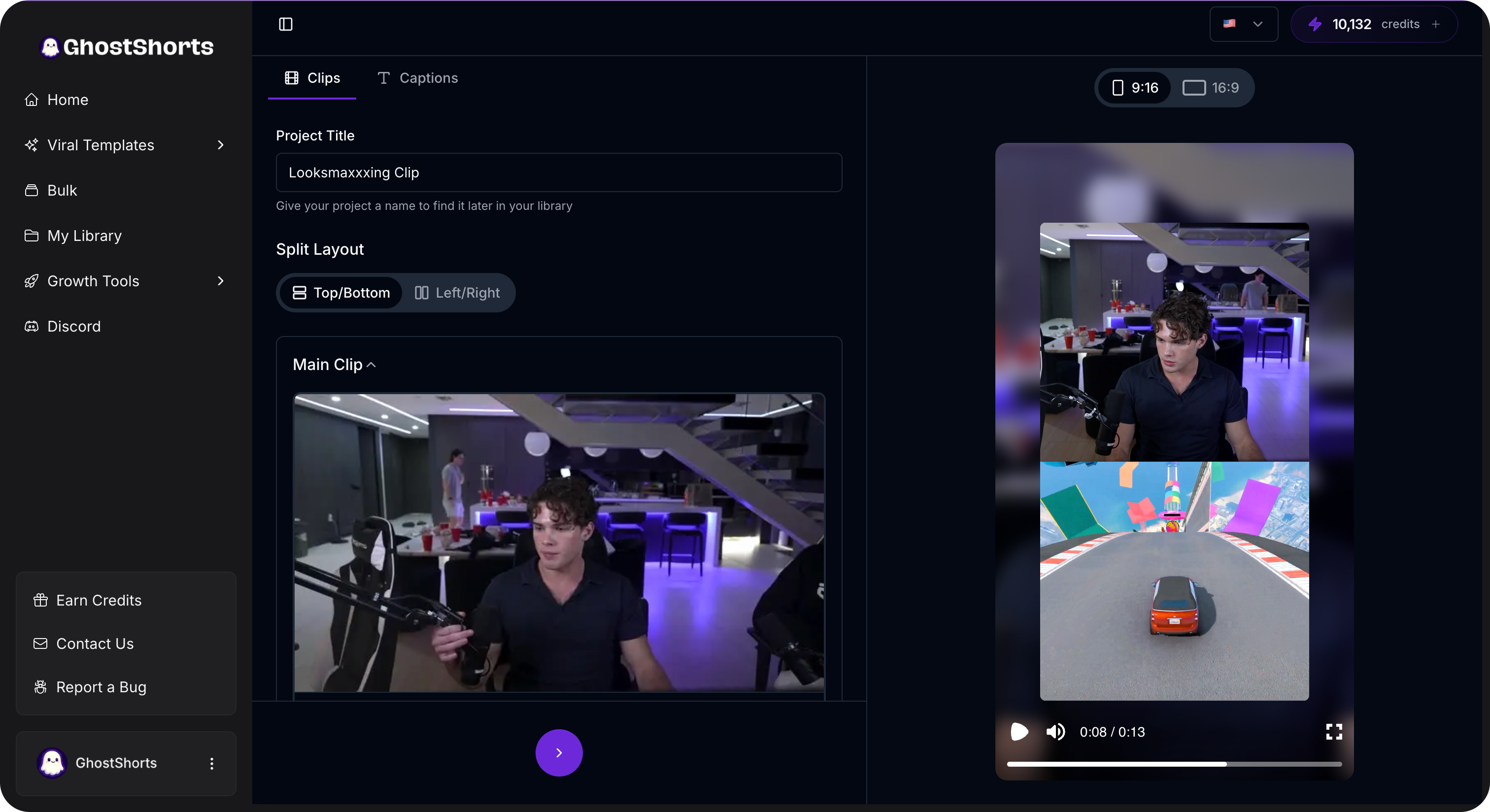
The whole process takes a few minutes instead of half an hour. That matters when you're trying to post reaction content consistently.
Step 5: Add Captions
This is non-negotiable in 2026.
85% of social media videos are watched without sound. If your reaction video relies on voiceover commentary (which most faceless reactions do), captions are the difference between someone watching and someone scrolling past.
Good captions also boost your SEO. TikTok and YouTube index caption text for search. Your keywords in captions = more discoverability.
Use GhostShorts' auto-caption tool to generate accurate, animated captions automatically. Or use CapCut's built-in caption feature if you're editing manually.
Either way, every reaction video needs captions. Period.
Some extra caption tips:
- Use a bold, readable font (not thin serif fonts that disappear on mobile)
- Place captions in the lower third or center of frame
- Color-code different speakers if you're reacting to someone else's audio
- Keep them synced. Delayed captions feel broken
Step 6: Hook and Edit
You have 0.5 seconds to stop someone from scrolling.
Your hook is everything. And for reaction videos, the hook usually isn't your reaction. It's a flash of the most shocking moment in the source content.
Hook formulas that work for reaction content:
- "Wait, did they really just..." + clip of the moment
- Show the wildest 2 seconds first, then rewind to the full reaction
- Start with your rating or verdict, then show the content that earned it
- Text overlay: "This is the worst take I've ever seen" + source clip
After the hook, keep the pacing tight. Cut dead air. Speed up slow sections. Add zoom-ins at key reaction moments.
Your edit should feel like a conversation, not a lecture.

Why Faceless Reaction Channels Are Booming
Let's talk about why this format is exploding right now.
Privacy. Not everyone wants their face attached to every opinion on the internet. Faceless reaction content lets you build an audience without personal exposure.
Scalability. When your face isn't in the video, anyone can help produce content. You can outsource editing, hire writers for commentary, or batch-produce dozens of videos in a day. Try doing that when every video needs you on camera.
No camera anxiety. A huge percentage of people never start creating because they're uncomfortable on camera. Faceless reaction removes that barrier completely.
Lower production costs. No ring light, no camera, no studio setup. A mic, a screen recorder, and an editing tool. That's it.
Faster turnaround. Trending content moves fast. By the time you set up a camera, do your hair, and record yourself reacting, the trend might be over. Faceless formats let you react and publish in minutes.
The creators who figured this out early are building massive channels. Some faceless reaction accounts on TikTok have crossed 1M+ followers without ever showing a single frame of their face.
How Reaction Content Hacks the Algorithm
Here's the part most people miss.
Reaction videos are piggybacking on content the algorithm already validated. Think about that.
When you react to a viral video, you're creating content around something the platform already knows people want to watch. The source material has proven engagement. Your video inherits some of that signal.
The algorithm sees:
- Similar audio/content to a viral video = likely to engage the same audience
- High watch time (because reactions are naturally engaging) = push to more people
- Comments and shares (people love debating reactions) = even more distribution
You're not starting from zero. You're starting from whatever momentum the source content already built.
This is why brand new accounts can blow up with reaction content. You're not asking the algorithm to bet on an unknown. You're attaching yourself to a proven winner.
Use trending hashtags from the original content plus reaction-specific ones. A tool like the GhostShorts hashtag generator can help you find the right mix for each post.
Tips for Adding Real Value (Don't Just Watch)
The worst reaction videos are the ones where someone just... watches. No commentary. No opinion. No added context.
That's not content. That's surveillance footage.
Here's how to actually add value:
- Correct mistakes. If the source content has wrong info, fact-check it. Viewers love this.
- Add expert context. "As someone who's been doing this for 3 years, here's what they missed..."
- Rate and rank. Give scores. Create tier lists. People engage like crazy with rating content.
- Play devil's advocate. Even if you agree, present the counter-argument. Sparks discussion.
- Predict outcomes. "Here's what happens next..." or "This will age badly because..."
- Connect it to a bigger trend. "This is part of a pattern I've been noticing..."
The goal is simple: after watching your reaction, the viewer should know something they didn't before. Or feel something stronger than they did before.
That's the difference between a reaction video that gets 500 views and one that gets 500K.

Best Niches for Faceless Reaction Content
Not every niche works equally well for reactions. These are the ones popping off right now:
- Food reviews and cooking fails. React to bizarre recipes, rate restaurant reviews, or roast cooking disasters.
- Dating and relationship takes. Endless source material. Unlimited engagement potential.
- Tech and gadget reveals. Unboxing reactions, "is this worth it?" content, and rating new products.
- Sports highlights. React to insane plays, controversial calls, and post-game drama.
- AI-generated content. "Is this AI or real?" is one of the most engaging formats of 2026.
- Music and sound. React to new releases, viral songs, or "first time hearing" content.
- Finance and investing. React to money tips, stock picks, and financial advice (good and terrible).
Pick a niche where you can consistently add commentary and opinions. The more specific your niche, the faster you build a loyal audience.
Start Posting Today
Here's the honest truth: faceless reaction videos have one of the lowest barriers to entry in content creation.
You don't need fancy equipment. You don't need editing experience. You don't need to be on camera.
You need a strong opinion, source content worth reacting to, and a way to combine them into a split-screen format.
Start with one video. Pick a trending clip. Record your voice reacting to it. Drop both into a split-screen tool, add captions, write a hook, and post it.
See what happens. Then make another one.
The creators building faceless reaction channels right now are going to look like geniuses in 6 months. The format is proven. The tools are easy. The only thing missing is your take.
So go react to something.