Videos with captions get 20-40% more views than videos without them.
That is not an opinion. That is what the data says across TikTok, YouTube Shorts, and Instagram Reels.
80% of social video is watched on mute. If your video has no captions, 4 out of 5 people are scrolling right past you without hearing a single word.
And here is the part most creators miss: YouTube and TikTok algorithms can actually read your caption text to better categorize your content. Captions are not just accessibility. They are SEO for video.
So you need captions. That part is obvious. The real question is: which method should you actually use?
There are at least 8 different ways to add captions to a video in 2026. Some are free. Some cost $30+/month. Some take 2 minutes. Some take 45.
I tested all of them so you do not have to.
Every Caption Method Compared (Side by Side)
Here is the full breakdown. Bookmark this.
| Tool/Method | Accuracy | Speed | Customization | Cost | Best For |
|---|---|---|---|---|---|
| TikTok Built-in | 88-92% | Fast (auto) | Very limited | Free | TikTok-only creators |
| YouTube Auto-Captions | 90-94% | Fast (auto) | None (CC only) | Free | YouTube-only creators |
| CapCut | 93-96% | 30-90 sec | Good | Free / $7.99/mo | Budget mobile editors |
| Descript | 96-98% | During import | Moderate | Free / $24-33/mo | Podcasters, long-form |
| Captions.ai | 95-97% | 15-30 sec | Great | Free / $9.99/mo | Solo creators on mobile |
| Submagic | 95-97% | 10-20 sec | Great | $19/mo | Clip-focused creators |
| GhostShorts | 96-98% | Instant (built-in) | Extensive | Included in plans | Faceless creators |
| Manual (SRT files) | 100% (you wrote it) | 30-60 min | Full control | Free | Perfectionists |
That is a lot of options. Let me break each one down.

TikTok's Built-in Captions
The good: It is free, it is fast, and it happens right inside TikTok. Zero extra tools needed.
The bad: Accuracy sits around 88-92%. If your video has any background music, that number drops fast. And the customization options? Basically nonexistent. You get one font, a few colors, and that is it.
The ugly truth: TikTok captions look like TikTok captions. Everyone recognizes them. They are not ugly, but they scream "I used the default."
You also cannot reuse TikTok captions on other platforms. So if you are posting across YouTube Shorts, Reels, and TikTok, you are captioning the same video three different times.
Verdict: Fine if you only post on TikTok and do not care about styling.
YouTube Auto-Captions
YouTube generates captions automatically for every video. The accuracy has improved a lot - sitting around 90-94% now.
But here is the problem. These are closed captions (CC). They are not burned into the video. Viewers have to manually turn them on.
For YouTube Shorts specifically, most viewers never toggle CC on. So your "captions" are invisible to most of your audience.
YouTube's auto-captions are great for long-form SEO (the algorithm reads them). But for Shorts engagement? Not enough.
Verdict: Useful for discoverability, not for viewer retention. You still need burned-in captions for Shorts.
CapCut
Still the most popular free option. And honestly, CapCut's auto captions are solid for a free tool.
Accuracy: 93-96%. Drops with background noise.
Speed: 30-90 seconds for transcription, then 5-15 minutes of manual editing and styling.
The real cost: Your time. CapCut captions require a separate step in your workflow. Import video, generate captions, fix errors, style them, export. Every single time.
If you are making 1-2 videos a week, that is fine. If you are making 20+ videos a month? Those 15-minute caption sessions add up to 5+ hours per month just on captions.
Verdict: Best free option for creators on zero budget who edit on mobile.

Descript
Descript does something clever. You edit the video by editing the transcript. Delete a word from the text, and it cuts from the video too.
Accuracy: 96-98%. One of the best in the business.
The catch: Descript is really a full editing suite that happens to have great captions. If you only need captions, paying $24-33/month feels steep.
The caption styles also lean professional. Think corporate videos and podcast clips. If you want the animated, word-by-word highlight style that performs best on TikTok and Shorts, Descript is not your best bet.
Verdict: Perfect for podcasters and long-form creators. Overkill (and overpriced) if you just need social media captions.
Captions.ai
This one blew up in 2025 and is still growing. Captions.ai is a mobile-first app that makes captioning dead simple.
Accuracy: 95-97%.
Speed: 15-30 seconds. Genuinely fast.
The appeal: The caption styles are trendy. They look like what top creators use. Word-by-word highlights, animated text, multiple color schemes.
The downside: The free tier is limited. And if you are producing faceless content (no talking head), the app loses a lot of its extra features since they are built around face detection and eye contact correction.
Verdict: Great for solo creators who film themselves talking. Less useful for faceless channels.
Want to skip the editing?
GhostShorts turns your ideas into viral shorts with AI voiceovers, captions, and gameplay clips. Ready to post in minutes.
Try GhostShorts TodaySubmagic
Submagic focuses specifically on short-form content. Upload a clip, get captions, get out.
Accuracy: 95-97%.
Speed: 10-20 seconds. One of the fastest.
What stands out: Submagic adds emojis and keywords automatically alongside your captions. It also generates hooks and descriptions. It is trying to be a one-stop short-form optimization tool, not just a captioner.
The problem: $19/month with no free tier. And those auto-generated emojis? Sometimes they are spot-on. Sometimes they are completely wrong and you have to remove them manually.
Verdict: Good for creators who want captions + optimization in one step. But you are paying for features you might not want.
GhostShorts Auto Captions
Here is where the approach is fundamentally different.
Every other tool on this list treats captioning as a separate step. You create your video, then you caption it. Two workflows. Two tools. Two rounds of exporting.
GhostShorts auto captions build captions directly into the video creation process. When you generate a video, captions are already there. No uploading to a second tool. No waiting for transcription. No separate export.
Accuracy: 96-98% for clear audio. Multiple languages supported.
Speed: Instant. Captions generate as part of video creation.
Customization: Word-by-word highlights, pop-up animations, karaoke style, full control over fonts, colors, size, and positioning.
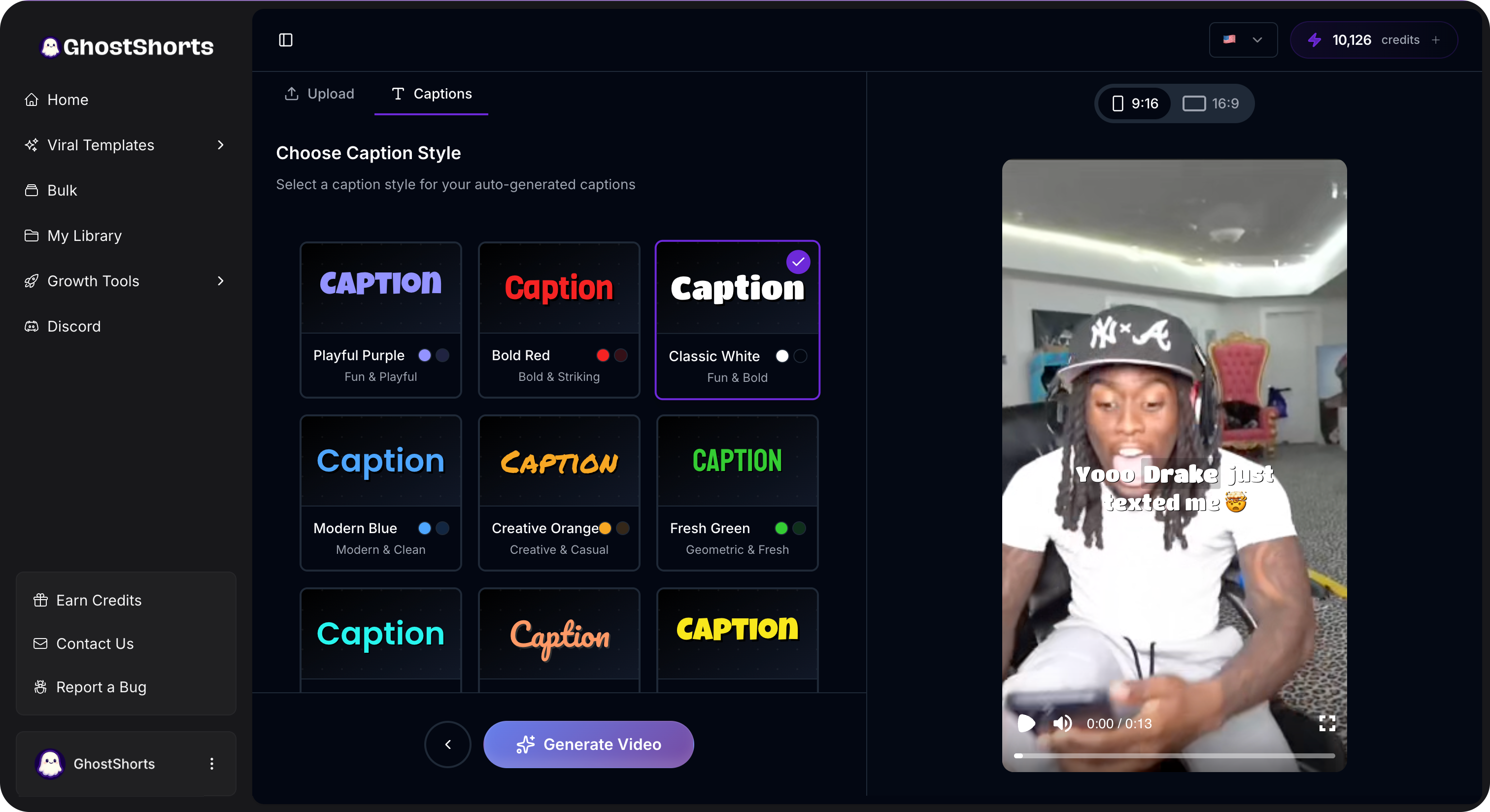
Why this matters for faceless creators: If you are running a faceless channel using split screen, Reddit stories, or fake text videos, your entire video is generated inside GhostShorts. Adding captions with an external tool means exporting, uploading, captioning, re-exporting. That is 10-15 minutes of busywork per video.
With GhostShorts, captions are just part of the output. Zero extra steps.
Verdict: The best option if you are producing faceless short-form content at scale. Captions are included with all plans, not a paid add-on.
Manual Captions (SRT Files)
The old-school approach. You write an SRT file with timestamps and import it into your editor.
Accuracy: 100%. Because you wrote every word yourself.
Speed: 30-60 minutes per video. Seriously.
When it makes sense: Almost never in 2026. The only legitimate use case is if you need captions in a language that AI tools do not support well, or if you are doing something highly specialized (medical content, legal content, heavy jargon).
Verdict: Skip this unless you have a very specific reason. AI tools are accurate enough that manual captioning is a waste of your time.
Which Method Is Best for YOUR Creator Type?
Not every creator needs the same tool. Here is a quick guide.
Beginner Creators (0-1K followers)
Use: CapCut or TikTok built-in.
You are still figuring out your content style. Do not spend money on caption tools yet. CapCut is free and good enough to get started.
The priority at this stage is posting consistently, not having perfect captions. Use the free tools, learn what works, and upgrade later.
Intermediate Creators (1K-50K followers)
Use: Captions.ai or Submagic.
You are posting regularly and you need captions that look professional. The trending styles from Captions.ai and Submagic will help your videos match what top creators are doing.
At this level, the time you save with faster tools is worth a $10-20/month subscription.
Pro Creators and Agencies (50K+ or managing multiple accounts)
Use: GhostShorts or Descript.
Time is money. You are producing high volumes of content across multiple channels.
If you are doing talking-head or podcast content, Descript's transcript-based editing is powerful.
If you are doing faceless content or short-form at scale, GhostShorts is the clear winner because captions are built into the workflow, not bolted on.
Faceless Channel Creators
Use: GhostShorts. Full stop.
This is not even close. Every other tool requires you to create the video first, then add captions as a separate step. GhostShorts generates the video AND the captions together.
If you are building a faceless channel - Reddit stories, motivational content, news compilations, top 5 lists - you should not be spending time on a separate captioning step. That time adds up fast when you are posting daily.

The Business Case: Why Captions Are Non-Negotiable in 2026
Let me give you the numbers that should end the debate.
Views: Captioned videos get 20-40% more views across every major platform. That is not a small edge. That is the difference between 10K views and 14K views on every single video you post.
Watch time: Captions increase average watch time by 12-15%. And watch time is the single most important metric for algorithmic distribution on TikTok, YouTube Shorts, and Reels.
Distribution: YouTube and TikTok algorithms parse caption text to understand your content. Better categorization means better recommendations. We covered this in detail in our post on YouTube Shorts monetization updates - captions now boost distribution by 20-30%.
Accessibility: Over 430 million people worldwide have disabling hearing loss. Captions make your content accessible to a massive audience you are currently ignoring.
SEO: Need to repurpose your video content? Captions give you instant transcripts. Use our YouTube transcript tool to pull transcripts from any YouTube video and repurpose them into blog posts, tweets, or newsletters.
The ROI is obvious. Even a 20% boost in views, compounded across every video you post, is the difference between a stagnant channel and a growing one.
Stop Overthinking. Start Captioning.
Here is the short version.
Zero budget? Use CapCut.
Talking-head creator? Use Captions.ai.
Podcaster? Use Descript.
Faceless creator or posting at scale? Use GhostShorts.
Want to waste 45 minutes per video? Use manual SRT files. (Please do not.)
The best caption method is the one you will actually use on every video. Pick the tool that fits your workflow, and never post an uncaptioned video again.
Your future view counts will thank you.