
Nobody can scroll past a "Top 5" video without watching at least half of it. That's not an accident.
Countdown videos are engineered to be binge-watched. The brain treats an unfinished sequence as an open loop. Viewers have to close it by watching to the end. Every reveal gives a small hit of satisfaction, and then immediately: "Okay, but what's next?" Repeat that five times, you've held someone for the full video.
Rankings also invite disagreement. Someone always thinks you got it wrong. That disagreement floods the comments, which drives engagement signals, which pushes the video to more people. Comment rates on countdown videos run 2-4x higher than standard talking-head clips in the same niche. High completion rate + high comment rate = viral candidate.
That's the whole game. Here's how to make them.
Scripting a Countdown: Build Suspense From the Start
Tease #1 in the intro. Don't reveal it, just hint. "The #1 spot on this list is going to make some of you close the app." Now they can't leave.
Structure each entry the same way:
- Name the entry and its number
- Give the clip or visual
- Add one sentence of commentary, a hot take, or a stat
- Tease the next entry: "But wait until you see what beat this..."
Keep each entry tight. 10-20 seconds per entry is plenty. Don't monologue.
The transition between entries is where you pick up or lose momentum. More on that below.

Sourcing Clips Legally
This is where a lot of creators trip up. A few safe options:
Stock footage: Pexels, Pixabay, Storyblocks, and Artgrid all have royalty-free clips. Great for travel, nature, fitness, and lifestyle content.
Licensed B-roll: If you're doing sports or entertainment, platforms like Getty or AP have licensed content. It costs money but it's clean.
Your own recordings: Even phone footage works for food, fitness, and daily life content. Raw and authentic often outperforms polished.
Public domain footage: Historical content before 1928 is fair game. Great for history niches.
Screen recordings with commentary: For gaming and tech, recording your own gameplay or product walkthrough and ranking it is 100% legal and often performs best.
The key: curate before you create. Pull 6-8 clips before you start editing so you're not hunting mid-session.
Making Top 5 Videos with GhostShorts
Once you have your clips ready, this is where GhostShorts turns a 2-hour edit into a 10-minute job.
Here's the exact flow inside the Top 5 tool:
- Give it a title. One main title that stays pinned at the top of the video throughout the entire countdown. Sets the stakes immediately.
- Upload 2-10 clips. Each clip becomes one rank in your countdown. Drop in your pre-curated footage.
- Label each clip. Give every clip its own entry title. That's your "Number 5: [name]" text that appears on screen.
- Drag to order. Arrange clips in countdown sequence from #5 down to #1. Drag and drop, nothing to it.
- Customize the vibe. Pick your fonts, colors, and caption styles. Choose effects between clips: blur transitions, bass boosts, smooth cuts. This is where your video gets a personality.
- Generate and export. One click auto-assembles everything. The title stays pinned at the top, numbered rankings show up on each entry, transitions fire between clips, and captions are baked in automatically.
That's it. No timeline scrubbing. No keyframing. No rendering with your fingers crossed.
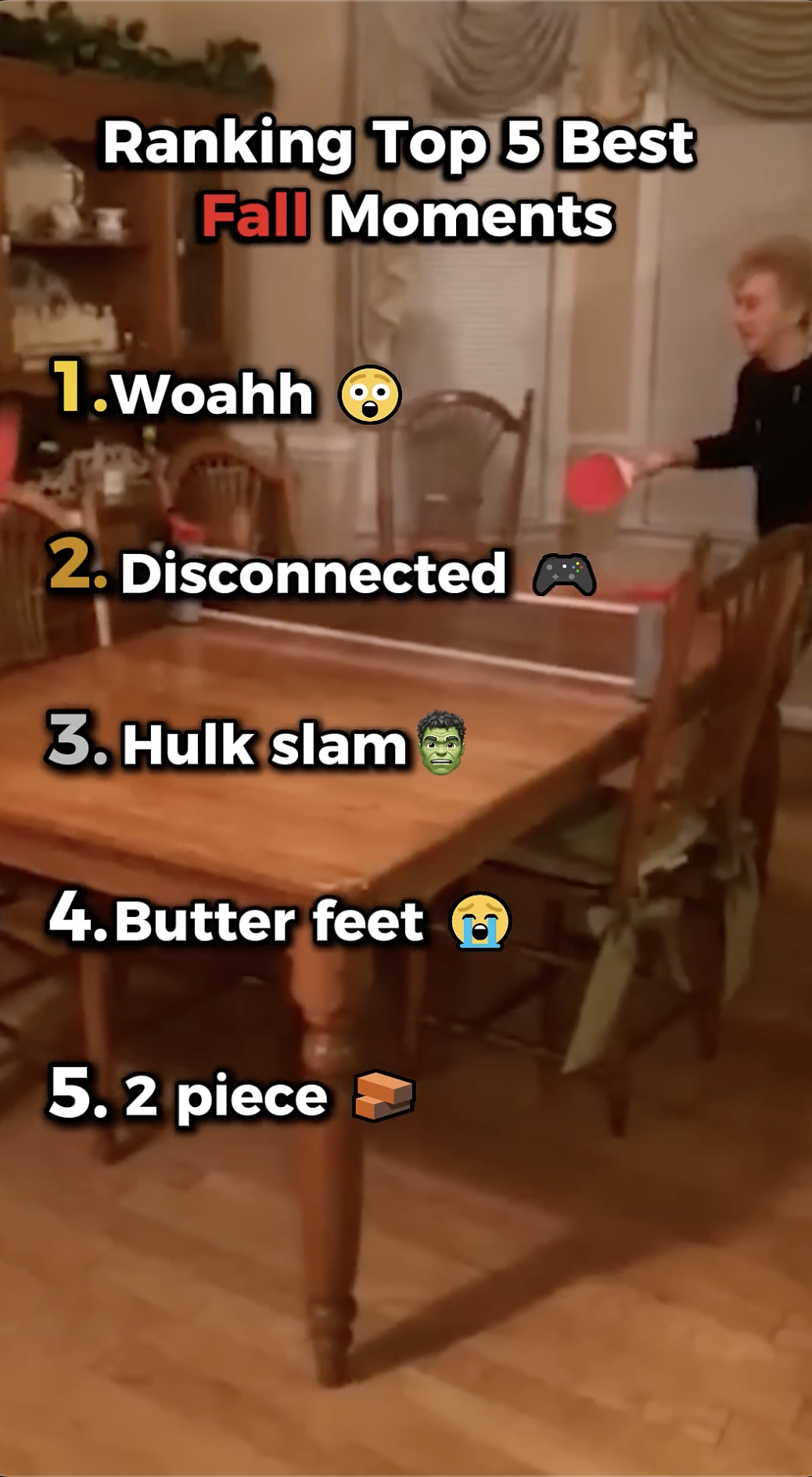
The output looks like this. Title pinned, rankings numbered, transitions clean, captions on.
Production Tips: Pacing, Transitions, and Title Cards
Pacing is everything. Each entry should move faster than the previous one. By the time you hit #2 and #1, the cuts should feel rapid and punchy. The energy should be building, not steady.
Transitions should match the vibe. For hype/sports content, use sharp cuts and bass boosts between entries. For calmer niches like travel or food, smooth dissolves work better. GhostShorts lets you set this per video.
The title card matters. Your main title lives at the top of the screen for the full video. Make it big, make it readable, and keep it to 5-7 words max. "Top 5 NBA Plays Nobody Talks About" is better than "Top 5 Most Underrated and Overlooked NBA Plays From Recent History."
Auto-captions are non-negotiable. A huge percentage of short-form video is watched without sound. If your commentary isn't captioned, you're leaving engagement on the table. GhostShorts auto-captions everything in the export.
Want to skip the editing?
GhostShorts turns your ideas into viral shorts with AI voiceovers, captions, and gameplay clips. Ready to post in minutes.
Try GhostShorts TodayBest Niches for Top 5 Videos
Some topics are just built for this format. Here's where the view potential is highest:
| Niche | Example Topics | View Potential |
|---|---|---|
| Sports | Top 5 clutch moments, best dunks, worst injuries | Very High |
| Music | Top 5 rap verses, most-played songs of the decade, underrated albums | Very High |
| Gaming | Top 5 hardest bosses, best open worlds, fastest speedruns | High |
| Food | Top 5 fast food items, best ramen spots, most underrated dishes | High |
| Movies / TV | Top 5 plot twists, best villains, worst finales | Very High |
| Fitness | Top 5 exercises for X goal, best pre-workouts, worst gym mistakes | Medium-High |
| History | Top 5 unsolved mysteries, biggest battles, wildest coincidences | High |
| Travel | Top 5 underrated countries, cheapest destinations, overrated tourist traps | High |
| Tech Gadgets | Top 5 phones of the year, best budget buys, gadgets nobody asked for | High |
| True Crime | Top 5 cold cases, biggest heists, weirdest trials | Very High |
Pick a niche you know. Your commentary between clips is what separates a good countdown from a forgettable one. Credibility shows.
How to Pick Topics That Spark Debate
The best countdown topics have one thing in common: there is no objectively correct answer.
"Top 5 fastest 100m sprints" is just a facts video. Boring.
"Top 5 greatest athletes of all time" is a war. That's what you want.
A few frames that always work:
- "Underrated vs overrated": Any list that implies something is overrated will immediately get defenders in the comments.
- "All-time vs right now": Comparing eras is crack for sports and music fans.
- "Worst of" instead of "best of": Negativity frames are deeply clickable.
- Regional or genre-specific: "Top 5 UK rappers" will get every US fan and every UK fan into the comments at the same time.
The more your title suggests a debatable opinion, the more comments you'll get.
Titles and Thumbnails for Maximum Click-Through
Your title has one job: create enough curiosity or controversy that someone taps.
Formulas that consistently work:
- "Top 5 [X] That Nobody Talks About"
- "Top 5 [X] Ranked Worst to Best (You'll Disagree)"
- "I Ranked the Top 5 [X] So You Don't Have To"
- "The Top 5 [X] of All Time - This Will Make You Mad"
For thumbnails: Use a bold number (5... 4... 3...) overlaid on the most visually interesting frame. Add your title text big enough to read at thumbnail size. Faces work well if your content has them. High contrast wins.
On TikTok and YouTube Shorts, your first frame acts as the thumbnail. Make sure it's a hook, not a blank or boring shot.
Batch Creating 10 Countdown Videos in One Session
This is the move if you want to build a library fast.
Pick one niche and stay in it. If you do sports countdown videos, spend a session batch-creating 10 different sports countdowns. Your clip sourcing becomes faster because you already know where to look.
Create a clip library first. Before you touch GhostShorts, pull 50-60 clips organized by topic. Then you're just sorting and labeling, not hunting.
Use the same template settings. Lock in your fonts, colors, and caption style once per session. Apply the same vibe across all 10 videos so they feel like a series.
Script the commentary in bulk. Write all 10 voiceover scripts or text overlays before you start any video. Batch thinking is faster than switching contexts.
A realistic session looks like this:
- 30 min: clip sourcing and organizing
- 15 min: setting up your first video in GhostShorts
- 5 min: each subsequent video (once your template is dialed)
- Total: ~90 minutes for 10 videos
That's a week of content in one sit-down.

Repurposing Top 5 Videos Across Platforms
One countdown video can live in five places with zero extra editing.
TikTok: Post as-is. The vertical format, captions, and pacing are already optimized. Post with a niche-specific hashtag and a trending audio overlay.
YouTube Shorts: Same video. YouTube Shorts rewards high completion rates, which countdowns naturally deliver. Title it slightly differently for SEO.
Instagram Reels: Direct repost. If you have the Reels audience, countdown content crushes because it fits the scroll behavior perfectly.
Instagram Stories: Use individual frames or clips from the video as Story slides. Tease the #1 pick to drive people to your Reel.
Pinterest: Export a static graphic version of your top 5 list. Countdown content in infographic form does surprisingly well on Pinterest for evergreen niches like food, travel, and fitness.
One session of batch-creating. One video exported. Five platforms covered.
The Format That Keeps Winning
Countdown videos are not a trend. They're a format that's been working since "Top 10 at 10" on the radio.
The platform changes. The algorithm changes. The niche changes. The format doesn't.
Pick a topic people argue about. Rank it. Film the reaction.
GhostShorts handles the production so you can focus on picking fights with the internet about the right things.
And make sure your auto-captions are on. That's how the people watching in silence still understand why your #1 is correct.
Try the Top 5 tool and turn on auto-captions while you're at it.