You've Already Been Hooked by This Format
Think about the last time you scrolled TikTok.
Someone telling a story on the top half. Subway Surfers running on the bottom. You couldn't look away. You watched the whole thing.
That's the split screen video format. And it's not going anywhere.
In 2026, split screen TikTok videos average 72% higher watch time compared to single-frame videos in the same niches. Completion rates run 30-45% higher on videos between 30-90 seconds. Replay rates jump 18%, which tells the algorithm to push your content further.
TikTok's algorithm heavily rewards watch time and completion rate. A video that keeps people watching for 45 seconds instead of 25 gets dramatically more distribution. Split screen gives you that retention boost without requiring better content.
If you're not using split screen videos on TikTok yet, you're leaving views on the table.
Here's how to start.
How to Make Split Screen TikTok Videos (3 Methods)
Method 1: GhostShorts (Fastest)
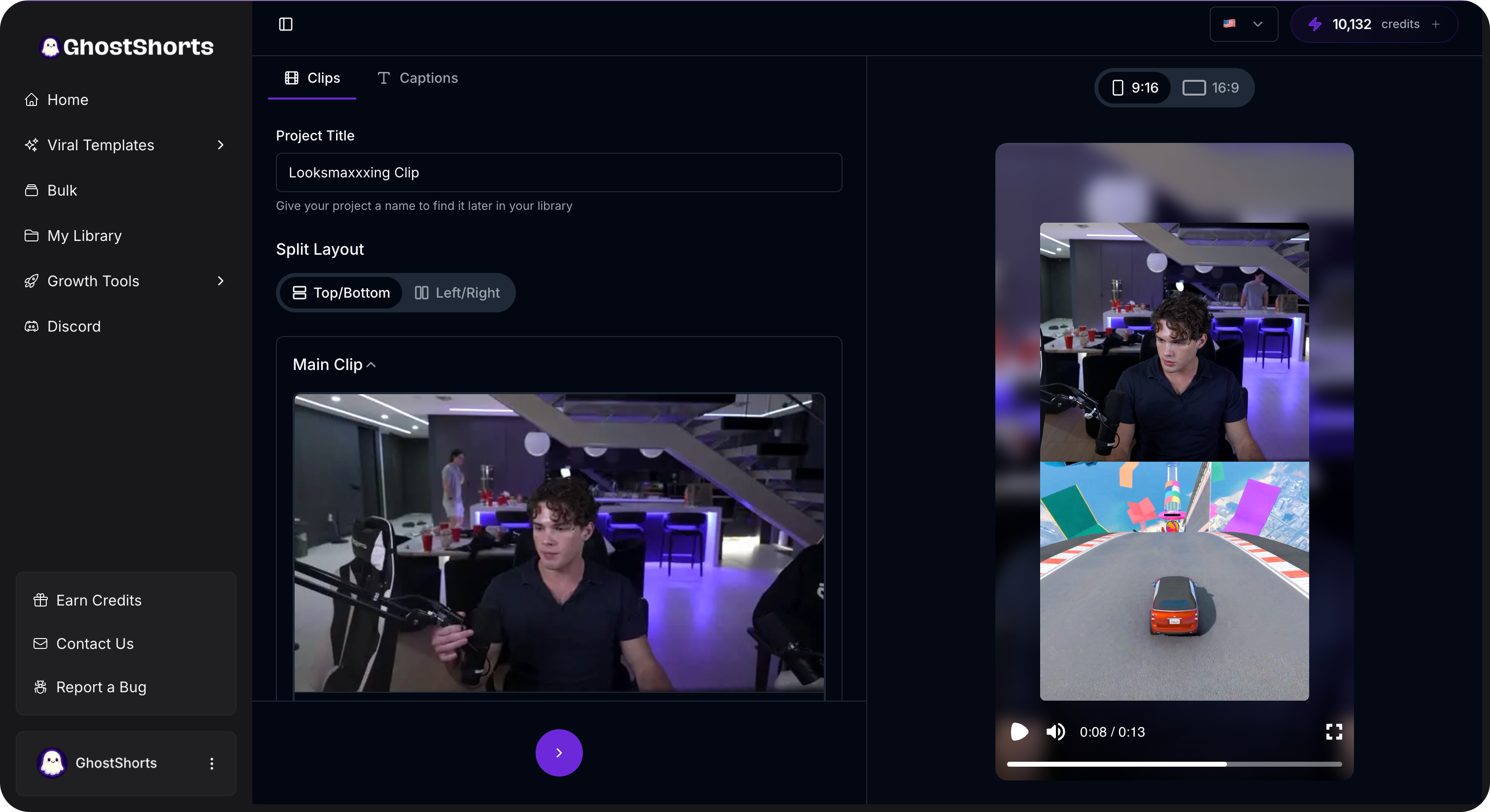
If you don't want to spend hours in a video editor, GhostShorts' split screen feature was built for this exact format.
Here's how it works:
- Choose your primary content. Upload a video, paste a script, or let AI generate it
- Pick a layout. Top/bottom split, side by side, or picture-in-picture
- Select secondary footage. Choose from a library of gameplay clips, satisfying footage, and retention-boosting backgrounds
- Customize and export. Adjust the split ratio, add captions, export in TikTok-ready format
The whole thing takes under 5 minutes. Compare that to 30-60 minutes of manual editing.
Since the split screen feature is built into the full pipeline, you can also add auto captions, choose music, and apply effects without switching tools.
Method 2: CapCut (Free)
Solid free option if you want to do it manually.
- Open CapCut, new project, 9:16 aspect ratio
- Import your primary content
- Tap "Overlay" and add secondary footage
- Resize and position each clip to fill its half
- Align timing so both clips sync up
- Export at 1080x1920
Time: 15-30 minutes per video.
Downside: You source your own secondary footage, alignment can be finicky, and there's no way to batch produce.
Method 3: Desktop Editors (Premiere Pro, DaVinci Resolve)
Maximum control. More time investment.
- New project at 1080x1920 (9:16)
- Primary content on Video Track 1
- Secondary footage on Video Track 2
- Crop/scale each clip to fill half the frame
- Position using X/Y coordinates (primary at Y = -25%, secondary at Y = +25%)
- Add transitions, text, effects
- Export H.264, optimized for social
Time: 30-60 minutes per video.
Best for: Creators who already use these editors and want precise control.
The 5 Split Screen Styles That Actually Work
Not all split screen formats perform equally. Here are the five that consistently win.
1. Gameplay + Storytelling (The Classic)
This started the whole trend. Story on top. Satisfying gameplay on the bottom.
Best gameplay options:
- Subway Surfers (the OG, still works)
- Minecraft parkour
- Satisfying mobile games
- GTA driving clips
- Temple Run or similar endless runners
Use it for: Long-form storytelling (45 seconds to 3 minutes), Reddit story narrations, personal anecdotes, anything where audio carries the value.
Retention boost: 40-65% longer watch times compared to telling the same story as a talking head.
2. Reaction + Original Content
Your reaction on one side. The original content on the other. Viewers see both at the same time.
Use it for: Reacting to viral clips, reviewing other creators, watching fails, commenting on trending topics.
Retention boost: 25-35% higher completion rates when reactions are genuinely engaging.
3. Tutorial + Demonstration
Instructions on one half. Live demo on the other. Huge in cooking, beauty, fitness, and tech.
Use it for: Any how-to content where showing and explaining at the same time adds value.
Retention boost: 30-50% longer watch times. Viewers don't have to wait for explanations between action shots.
4. Before and After (Side by Side)
Vertical split. Before on one side. After on the other. Transformations, makeovers, room renovations, photo edits, fitness progress.
Use it for: Anything involving transformation or comparison.
Retention boost: 20-30% higher engagement from the built-in curiosity factor.
5. ASMR/Satisfying Footage + Educational Content
Same idea as gameplay, but swap it for oddly satisfying footage. Soap cutting, sand kinetics, paint mixing, pressure washing.
Use it for: Educational content, fun facts, list-style videos, or anything information-heavy where you need to hold attention.
Retention boost: 35-55% improvement in watch time. Especially effective with the 18-24 age range.
Want to skip the editing?
GhostShorts turns your ideas into viral shorts with AI voiceovers, captions, and gameplay clips. Ready to post in minutes.
Try GhostShorts TodayBest Practices for Maximum Retention
Get the Split Ratio Right
50/50 isn't always the answer.
- 60/40 (primary on top, smaller secondary on bottom) - Best for storytelling and educational content
- 50/50 - Best for reactions and before/after comparisons
- 70/30 (primary dominant, small secondary strip) - Works when secondary footage is just a subtle attention anchor
Test different ratios. Check your analytics. The right split depends on your content type and audience.
Match the Energy
This is where people mess up.
High-energy gameplay paired with calm, slow content? Jarring. It actually hurts retention.
Pair them right:
- Fast storytelling + Subway Surfers or parkour
- Calm educational content + satisfying ASMR or slow cooking
- Intense reactions + any high-energy secondary footage
- Motivational content + scenic driving or nature clips
Always Add Captions
With two visual streams competing for attention, on-screen text gives viewers a third anchor point.
Split screen videos with captions retain 22% more viewers than those without.
Use GhostShorts' auto caption feature to add them automatically. Or do it manually in your editor.
Nail the First Frame
TikTok's algorithm evaluates your thumbnail and first frame for initial distribution. For split screen:
- First frame of primary content needs to be visually interesting (not a black screen)
- Secondary footage should start with movement immediately
- Any text or hook should be visible in the top portion where eyes land first
Hit the Sweet Spot on Length
Split screen has an ideal length range.
- 45-90 seconds: Highest completion rates
- 90 seconds to 2 minutes: Best total watch time (lower completion but more seconds watched)
- Under 30 seconds: Split screen barely helps at this length
- Over 3 minutes: Diminishing returns unless the content is exceptional
Mistakes That Kill Your Retention
Copyrighted gameplay. Most game studios allow their footage in content. Some don't. Stick to widely accepted games or use royalty-free satisfying footage.
Too many splits. Three or four sections on screen? Your brain can track two streams. Not four. Keep it clean.
Bad audio balance. If secondary footage has its own audio, set it to 10-15% volume or mute it entirely. Primary audio should always dominate.
Not testing both versions. Not every video performs better as a split screen. Create both versions of the same content sometimes and compare. Let the data tell you what works.
How Split Screen Fits Your Bigger Strategy
Split screen isn't magic. It's one tool in your content toolkit. Here's how to use it strategically.
Use it for longer content. That's where retention is hardest to maintain. For quick, punchy videos under 15 seconds, standard single-frame often performs just as well.
Stack retention techniques. Pair split screen with a strong hook in the first line, open loops that create curiosity, and clear payoffs that reward viewers for staying.
Repurpose content. Got a YouTube video or podcast episode you want to turn into TikTok content? Split screen makes audio-heavy content visually engaging for short-form audiences.
Track everything. After posting 10-15 split screen videos, compare against your standard content. Average watch time, completion rate, follower growth per video. The data will tell you exactly how much the format is helping your account.
Start Your First Split Screen Video Today
This format isn't a trend. It's been proven over multiple years and keeps evolving.
The fastest way to start is with GhostShorts' split screen tool. It handles the technical setup so you can focus on making great content.
Pick one of the five styles above. Make one video today. Compare it against your last five standard posts.
The retention numbers will speak for themselves.